-
Shop
- Advanced Technologies
- AI Skills Mastery 2026 Collection
- Beauty
- Best-Sellers
- Calvin Klein
- Car Accessories
- Car Buying & Ownership
- Dating & Social Confidence
- Dating & Social Skills
- Denim
- 7FOR
- AGOLDE
- Antony Morato
- Armani Exchange
- Boss
- Brunello Cucinelli
- Calvin Klein Jeans
- Costume National
- Desigual
- Diesel
- Dolce & Gabbana
- Dsquared²
- Ermanno Scervino
- Fendi
- Gianni Lupo
- Guess Jeans
- Ichi
- Just Cavalli
- Lee
- Levi's
- Liu Jo
- Morgan De Toi
- Mother Denim
- Only
- Pepe Jeans
- Pinko
- Replay
- Tommy Hilfiger Jeans
- Valentino
- Vero Moda
- Digital Resources
- Education & Learning
- Family & Parenting
- Fashion
- Alexander McQueen
- Bags & Wallets
- Balenciaga
- Belts
- Bottega Veneta
- Brunello Cucinelli
- Burberry
- Chanel
- Chloé
- Dior
- Dolce & Gabbana
- Etro
- Fendi
- Gucci
- Hats & Hair Accessories
- Jacquemus
- Jewelry
- Jil Sander
- Jimmy Choo
- Keychains
- Kiton
- Miu Miu
- Off-White
- Prada
- Rick Owens
- Saint Laurent
- Shoes
- Socks & Tights
- Sunglasses
- The Row
- Tom Ford
- Valentino
- Valentino Garavani
- Versace
- Vivienne Westwood
- Watches
- Fashion & Style
- Fashion Accessories
- Financial Education
- Find Your Path Collection
- Fitness
- Furniture
- Gadgets
- Health & Beauty
- Health & Wellness
- Home & Garden
- Home & Kitchen
- Home Styling & Organization
- Home Supplies
- Kids & Babies
- Kitchen
- Lighting
- Nike
- Online Business
- Online Business for Beginners
- Parenting
- Patio, Lawn & Garden
- Personal Growth
- Pet Care
- Pet Supplies
- Pets
- Smart Life with IA
- Sport & Outdoors
- Super Deals
- Travel
- Wealth
- Wealth Building
- Wellness
- YouTube Shorts Best-Sellers
- Popular
- Best deals
Is Your Keyboard Hot-Swappable? Quick Ways to Check
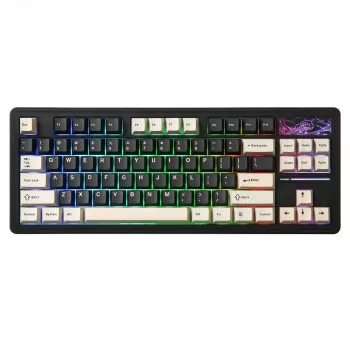
How do you know if a keyboard is hot-swappable?
A keyboard is hot-swappable if you can remove and replace the switches without soldering. The simplest way to confirm it is to check the product listing or manual for phrases like “hot-swappable,” “hot-swap sockets,” or “5-pin/3-pin hot-swap.” If that language is missing, assume it’s not hot-swappable until you verify it elsewhere.
Check the specs first (fastest and safest)
Look for a dedicated “Hot-swappable” line in the specifications, plus details about compatibility (often Cherry MX-style switches). Many brands will also specify whether the sockets accept 3-pin switches only or both 3-pin and 5-pin switches. If a keyboard supports 5-pin hot-swap, it typically supports 3-pin as well (with the extra plastic legs simply absent).
Look for socket photos or PCB mentions
If the listing includes a teardown or PCB photo, hot-swap boards usually show metal hot-swap sockets on the back of the PCB. Descriptions may name the socket type (for example, Kailh hot-swap sockets). If you only see solder joints for every switch position, it’s a soldered PCB, not hot-swap.
Confirm by how the keyboard is built
Hot-swappable keyboards are designed for switch changes, so they often mention switch pullers in the box, “switch replacement,” or “tool-free switch swapping.” If the keyboard is advertised as a customizable platform for trying different switch types, that’s another strong signal—though it still needs explicit hot-swap confirmation.
Avoid risky “tests”
Don’t try prying out a switch to “see what happens.” On a non-hot-swap board, pulling a switch can damage the PCB pads or crack the switch housing. Verify through documentation, official Q&A, or detailed product photos instead.
For a deeper breakdown of hot-swap features and what to look for in a compact gaming layout, see the full guide here: https://luxian.shop/guide-wireless-hot-swappable-tkl-keyboard-87-key-rgb-gaming/.
FAQ
Can hot-swappable keyboards use any switch?
Most hot-swappable keyboards are made for Cherry MX-style switches, but compatibility can vary. Check whether the board supports 3-pin only or both 3-pin and 5-pin, and confirm the switch type (MX vs. optical vs. low-profile) before buying switches.
Recommended for you
Safe Mini USB Aroma Humidifier & Diffuser Use Guide
Jul 19, 2026
Hot-Swappable Keyboards: Are They Really Universal?
Jul 19, 2026













Leave a comment