-
Shop
- Advanced Technologies
- AI Skills Mastery 2026 Collection
- Beauty
- Best-Sellers
- Calvin Klein
- Car Accessories
- Car Buying & Ownership
- Dating & Social Confidence
- Dating & Social Skills
- Denim
- 7FOR
- AGOLDE
- Antony Morato
- Armani Exchange
- Boss
- Brunello Cucinelli
- Calvin Klein Jeans
- Costume National
- Desigual
- Diesel
- Dolce & Gabbana
- Dsquared²
- Ermanno Scervino
- Fendi
- Gianni Lupo
- Guess Jeans
- Ichi
- Just Cavalli
- Lee
- Levi's
- Liu Jo
- Morgan De Toi
- Mother Denim
- Only
- Pepe Jeans
- Pinko
- Replay
- Tommy Hilfiger Jeans
- Valentino
- Vero Moda
- Digital Resources
- Education & Learning
- Family & Parenting
- Fashion
- Alexander McQueen
- Bags & Wallets
- Balenciaga
- Belts
- Bottega Veneta
- Brunello Cucinelli
- Burberry
- Chanel
- Chloé
- Dior
- Dolce & Gabbana
- Etro
- Fendi
- Gucci
- Hats & Hair Accessories
- Jacquemus
- Jewelry
- Jil Sander
- Jimmy Choo
- Keychains
- Kiton
- Miu Miu
- Off-White
- Prada
- Rick Owens
- Saint Laurent
- Shoes
- Socks & Tights
- Sunglasses
- The Row
- Tom Ford
- Valentino
- Valentino Garavani
- Versace
- Vivienne Westwood
- Watches
- Fashion & Style
- Fashion Accessories
- Financial Education
- Find Your Path Collection
- Fitness
- Furniture
- Gadgets
- Health & Beauty
- Health & Wellness
- Home & Garden
- Home & Kitchen
- Home Styling & Organization
- Home Supplies
- Kids & Babies
- Kitchen
- Lighting
- Nike
- Online Business
- Online Business for Beginners
- Parenting
- Patio, Lawn & Garden
- Personal Growth
- Pet Care
- Pet Supplies
- Pets
- Smart Life with IA
- Sport & Outdoors
- Super Deals
- Travel
- Wealth
- Wealth Building
- Wellness
- YouTube Shorts Best-Sellers
- Popular
- Best deals
Hot-Swappable Keyboard Benefits: Customize in Minutes

What are the benefits of a hot-swappable keyboard?
A hot-swappable keyboard lets you remove and replace mechanical switches without soldering. That one feature can make a keyboard more customizable, easier to maintain, and cheaper to upgrade over time—especially if you like experimenting with different switch feels for gaming, typing, or office work.
1) Fast, tool-friendly customization
With hot-swap sockets, changing switches is mostly a matter of pulling keycaps and switches, then pressing new switches in. You can go from a light linear switch to a tactile switch in minutes, or mix switch types (like quieter switches on the alphas and clickier ones on function keys) to match how you actually use the board.
2) Easier repairs and longer keyboard life
If a switch starts chattering, double-typing, or failing, you can replace only that switch instead of replacing the whole keyboard. This makes maintenance simpler and extends the useful life of your board, since a single bad switch doesn’t have to be a dealbreaker.
3) Cost-effective upgrades
Hot-swappable designs reduce the risk and expense of major modifications. Instead of buying a new keyboard to change the typing feel, you can swap in different switches and keep the same layout, case, and keycap set you already like.
4) Great for learning your preferences
Newer mechanical keyboard users often aren’t sure whether they’ll prefer linear, tactile, or clicky switches. Hot-swap makes it easy to test options without committing to a permanent soldered build—useful when dialing in comfort, sound, and actuation force.
5) Ideal for compact, feature-rich builds
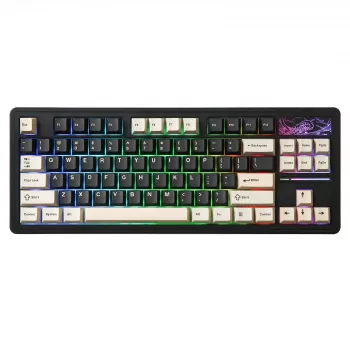
Hot-swap is especially popular on compact layouts like TKL boards where users want a streamlined footprint but still care about performance and personalization. For a deeper look at how hot-swap fits into a wireless TKL setup (including RGB and layout considerations), see this wireless hot-swappable TKL keyboard guide.
FAQ
Do hot-swappable keyboards work with any switch?
Most support specific switch types (commonly MX-style). Always check whether the board is 3-pin only or supports both 3-pin and 5-pin switches before buying new switches.
Recommended for you
TKL Keyboard Downsides: Who Should Avoid Tenkeyless
Jul 20, 2026
Versace Logo Lady Explained: Medusa and Meaning
Jul 20, 2026












Leave a comment