-
Shop
- Advanced Technologies
- AI Skills Mastery 2026 Collection
- Beauty
- Best-Sellers
- Calvin Klein
- Car Accessories
- Car Buying & Ownership
- Dating & Social Confidence
- Dating & Social Skills
- Denim
- 7FOR
- AGOLDE
- Antony Morato
- Armani Exchange
- Boss
- Brunello Cucinelli
- Calvin Klein Jeans
- Costume National
- Desigual
- Diesel
- Dolce & Gabbana
- Dsquared²
- Ermanno Scervino
- Fendi
- Gianni Lupo
- Guess Jeans
- Ichi
- Just Cavalli
- Lee
- Levi's
- Liu Jo
- Morgan De Toi
- Mother Denim
- Only
- Pepe Jeans
- Pinko
- Replay
- Tommy Hilfiger Jeans
- Valentino
- Vero Moda
- Digital Resources
- Education & Learning
- Family & Parenting
- Fashion
- Alexander McQueen
- Bags & Wallets
- Balenciaga
- Belts
- Bottega Veneta
- Brunello Cucinelli
- Burberry
- Chanel
- Chloé
- Dior
- Dolce & Gabbana
- Etro
- Fendi
- Gucci
- Hats & Hair Accessories
- Jacquemus
- Jewelry
- Jil Sander
- Jimmy Choo
- Keychains
- Kiton
- Miu Miu
- Off-White
- Prada
- Rick Owens
- Saint Laurent
- Shoes
- Socks & Tights
- Sunglasses
- The Row
- Tom Ford
- Valentino
- Valentino Garavani
- Versace
- Vivienne Westwood
- Watches
- Fashion & Style
- Fashion Accessories
- Financial Education
- Find Your Path Collection
- Fitness
- Furniture
- Gadgets
- Health & Beauty
- Health & Wellness
- Home & Garden
- Home & Kitchen
- Home Styling & Organization
- Home Supplies
- Kids & Babies
- Kitchen
- Lighting
- Nike
- Online Business
- Online Business for Beginners
- Parenting
- Patio, Lawn & Garden
- Personal Growth
- Pet Care
- Pet Supplies
- Pets
- Smart Life with IA
- Sport & Outdoors
- Super Deals
- Travel
- Wealth
- Wealth Building
- Wellness
- YouTube Shorts Best-Sellers
- Popular
- Best deals
YouTube Upload Checklist: Boost Reach, Watch Time & Clicks

Launch-Ready YouTube Video Checklist to Improve Reach, Watch Time, and Engagement
New uploads tend to perform best when the basics are handled consistently: a clear topic promise, strong packaging, helpful context, and early audience signals. A checklist-driven workflow focuses on what can be controlled before and after publishing so each video has the best chance to be discovered through YouTube search and recommendations. For platform guidance straight from the source, review the YouTube Help Center and lessons inside YouTube Creator Academy.
Set the foundation before recording
The easiest way to improve performance is to decide what “success” looks like before hitting record. That means one clear outcome, one angle, and a structure that keeps the viewer moving forward.
- Define the viewer’s problem and the exact outcome the video delivers in one sentence. If it can’t be said simply, it will be hard to communicate in the first 10 seconds.
- Choose one primary angle (beginner, comparison, tutorial, reaction, case study) and keep every segment supporting it. If a point doesn’t reinforce the angle, save it for a future upload.
- Plan a hook that proves value in 5–15 seconds: a result preview, a before/after, a quick win, or a bold claim backed by footage. The hook works best when it shows the payoff, not just promises it.
- Outline chapters with natural transitions so each section earns the next. “Now that you have X, here’s how to use it for Y” is stronger than abrupt topic jumps.
- Prepare supporting assets (screenshots, b-roll, on-screen text, and referenced links/resources) ahead of time so the edit stays tight and confident.
Package the video for clarity and clicks
Packaging is how viewers decide, in seconds, whether your video matches what they want. The goal is clarity at a glance—especially on mobile—without hype that the content can’t deliver.
- Write multiple title options that are specific, promise-driven, and easy to scan. Good titles feel like a straightforward solution to a known problem.
- Design a thumbnail with one focal subject, high contrast, and minimal text (or none). If it only works when zoomed in, it’s too busy.
- Match title and thumbnail so they tell the same story without feeling repetitive or misleading. Viewers should instantly understand the topic and expected result.
- Create a consistent visual style (color palette, framing, typography) so returning viewers recognize your uploads quickly.
- A/B iterate over time by changing one element at a time (title or thumbnail, not both) so you can learn what actually moved performance.
If you want a reusable system for titles, thumbnails, and video-page setup, YouTube SEO Mastery: Ultimate YouTube SEO Checklist for New Videos eBook – Boost Views, Rankings & Engagement is designed to be used as a step-by-step pre-publish and post-publish reference.
Optimize your video page details
Small details on the video page can reduce confusion and help the right viewers understand your video faster—especially those arriving from search or suggested videos.
For broader video discoverability best practices that also apply across platforms, see Google Search Central — Video Best Practices.
Strengthen watch time and session flow
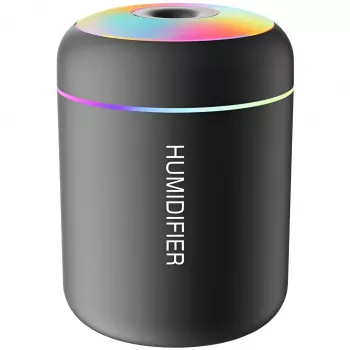
Editing and recording are easier when your setup feels comfortable for long sessions. If you work in a dry room or want a calmer desk vibe while you script or edit, the Mini USB Aroma Humidifier & Essential Oil Diffuser with Soft LED Light is a compact option that fits small creator workspaces.
Publishing cadence and the first 48 hours
New Upload Checklist: When to Do Each Step
| Timing | Action | Goal |
|---|---|---|
| Before recording | Define outcome + hook + chapter outline | Sharper focus and higher retention |
| Before upload | Finalize title/thumbnail variants | Clear promise and stronger click-through |
| At upload | Description first lines + chapters + end screens | Better understanding and smoother next-video flow |
| First 2 hours | Pin comment + reply to early viewers | Kickstart engagement and discussion |
| First 48 hours | Review retention + test packaging changes | Improve match between content and audience |
Use a repeatable checklist to reduce guesswork
- Turn the process into templates: one checklist for planning, one for upload settings, and one for post-publish actions.
- Keep a running log of hook type, thumbnail style, and structure so patterns are obvious over time.
- Build a personal best-practices library of winning titles, thumbnail layouts, and intro frameworks that consistently hold attention.
- Apply the same process to Shorts and long-form, adapting hooks and pacing to the format rather than reinventing your workflow.
- For a structured, step-by-step checklist that can be reused for every upload, use YouTube SEO Mastery: Ultimate YouTube SEO Checklist for New Videos eBook – Boost Views, Rankings & Engagement.
FAQ
How long should a YouTube description be for a new video?
Prioritize the first 2–3 lines with a clear summary and the main benefit, then add chapters and a short resource section below. Length matters less than clarity and usefulness.
Do tags still matter on YouTube?
Use tags sparingly for misspellings, alternate names, and niche terms that might not be obvious from the title and description. Most of the impact comes from clear packaging and strong viewer satisfaction signals.
What should be done if a video underperforms after publishing?
Refresh the packaging by changing either the title or thumbnail to better match what the video actually delivers, and strengthen next-step options with end screens and a pinned comment. Capture the pacing and structure lessons so the next upload improves.















Leave a comment