-
Shop
- Advanced Technologies
- AI Skills Mastery 2026 Collection
- Beauty
- Best-Sellers
- Calvin Klein
- Car Accessories
- Car Buying & Ownership
- Dating & Social Confidence
- Dating & Social Skills
- Denim
- 7FOR
- AGOLDE
- Antony Morato
- Armani Exchange
- Boss
- Brunello Cucinelli
- Calvin Klein Jeans
- Costume National
- Desigual
- Diesel
- Dolce & Gabbana
- Dsquared²
- Ermanno Scervino
- Fendi
- Gianni Lupo
- Guess Jeans
- Ichi
- Just Cavalli
- Lee
- Levi's
- Liu Jo
- Morgan De Toi
- Mother Denim
- Only
- Pepe Jeans
- Pinko
- Replay
- Tommy Hilfiger Jeans
- Valentino
- Vero Moda
- Digital Resources
- Education & Learning
- Family & Parenting
- Fashion
- Alexander McQueen
- Bags & Wallets
- Balenciaga
- Belts
- Bottega Veneta
- Brunello Cucinelli
- Burberry
- Chanel
- Chloé
- Dior
- Dolce & Gabbana
- Etro
- Fendi
- Gucci
- Hats & Hair Accessories
- Jacquemus
- Jewelry
- Jil Sander
- Jimmy Choo
- Keychains
- Kiton
- Miu Miu
- Off-White
- Prada
- Rick Owens
- Saint Laurent
- Shoes
- Socks & Tights
- Sunglasses
- The Row
- Tom Ford
- Valentino
- Valentino Garavani
- Versace
- Vivienne Westwood
- Watches
- Fashion & Style
- Fashion Accessories
- Financial Education
- Find Your Path Collection
- Fitness
- Furniture
- Gadgets
- Health & Beauty
- Health & Wellness
- Home & Garden
- Home & Kitchen
- Home Styling & Organization
- Home Supplies
- Kids & Babies
- Kitchen
- Lighting
- Nike
- Online Business
- Online Business for Beginners
- Parenting
- Patio, Lawn & Garden
- Personal Growth
- Pet Care
- Pet Supplies
- Pets
- Smart Life with IA
- Sport & Outdoors
- Super Deals
- Travel
- Wealth
- Wealth Building
- Wellness
- YouTube Shorts Best-Sellers
- Popular
- Best deals
TikTok Hashtag Checklist: Research, Mix & Test Tags Fast
Hashtag Hacks for TikTok Views: The Ultimate Checklist to Use Trending Tags Without Guesswork
Trending hashtags can expand reach fast, but only when they match your video’s topic, the audience you want, and the moment you post. The most reliable approach is a simple, repeatable system: research what’s working right now, build a tight hashtag mix for each post, and track which combinations actually lift retention and engagement.
If you want a plug-and-play workflow, the Hashtag Hacks for TikTok Views – The Ultimate Checklist to Skyrocket Engagement with Trending Hashtags is designed to speed up decisions while keeping your tags consistent and intentional.
What hashtags really do on TikTok
On TikTok, hashtags aren’t magic—they’re signals. When they match the content, they help the platform understand who might enjoy your video and what “bucket” it belongs in.
- They help categorize content so TikTok can test it with likely interested viewers.
- They signal topic, format, and community (for example: tutorial vs. storytime vs. challenge).
- They support discoverability through search and topic feeds when the caption and on-screen text also align.
- They work best when paired with clear video cues: spoken keywords, text overlay, and a consistent niche.
Think of hashtags as reinforcement, not a substitute for clarity. A vague video with “perfect” hashtags still tends to stall because viewers don’t instantly understand what they’re watching.
The 10-minute hashtag research routine (repeat daily)
This routine is built to be quick enough to do daily and structured enough to produce better options than copying whatever a big creator posted last week.
- Start with TikTok search: type the main topic, open a few suggested queries, and note recurring tags used by top-performing recent posts.
- Check the top 10–20 videos for each query and identify patterns: niche tags, format tags, and series tags.
- Scan comments for audience language that can become secondary keywords (often better than generic tags).
- Build a running shortlist of 30–60 tags split into: niche, format, community, seasonal, and branded/series.
- Avoid copying a competitor’s full hashtag set; reuse only the tags that match the actual video.
| Step | What to look for | Keep if |
|---|---|---|
| Search suggestions | Related queries and topics | It matches the exact video topic |
| Recent top posts | Common hashtags across multiple creators | Used by several accounts (not just one) |
| Caption + on-screen text | Words creators repeat alongside hashtags | The phrasing fits your audience language |
| Comment patterns | Questions and pain points | It can be answered by your content |
| Trend context | Is the hashtag tied to a meme/challenge? | Your video clearly participates in the trend |
Hashtag mix that balances reach and relevance
A strong set usually looks “boring” on purpose: it’s specific, readable, and tightly connected to what’s on screen.
- Use a layered mix instead of all broad tags: 1–2 broad, 2–4 niche, 1–2 format, 0–1 location (if relevant), plus a branded/series tag if used consistently.
- Prefer clarity over volume: a smaller set of highly relevant tags often outperforms a long list of vague tags.
- Include at least one tag that describes the video’s promise (example: tip, tutorial, recipe, review, beforeandafter).
- Create a “series” hashtag for repeatable formats to help returning viewers binge related videos.
- Rotate 2–3 different hashtag sets for the same content pillar and compare performance after enough posts.
Trending hashtags: when to use them (and when to skip)
For platform updates and feature changes that affect discovery, it helps to keep an eye on official sources like TikTok Newsroom and the TikTok Help Center.
Caption, on-screen text, and hashtags: make them agree
Mistakes that quietly reduce views
If you want more examples and guardrails for choosing tags, third-party breakdowns like Hootsuite’s overview can help you sanity-check the basics: Hootsuite: TikTok hashtags guide.
Track what works with a simple testing plan
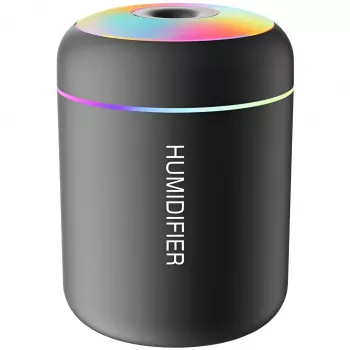
To make posting sessions smoother, many creators also set up a consistent filming environment. A small desk-friendly item like the Mini USB Aroma Humidifier & Essential Oil Diffuser with Soft LED Light can help keep your workspace comfortable during batch recording—especially when you’re filming multiple takes.
Printable checklist for faster posting
| Checkpoint | Yes/No | Notes |
|---|---|---|
| Primary topic is obvious in first second (text/visual) | ||
| Caption matches the promise of the video | ||
| 1–2 broad tags included (only if relevant) | ||
| 2–4 niche tags included (high relevance) | ||
| 1–2 format tags included (tutorial/review/storytime) | ||
| Trend tag used only if the video clearly participates | ||
| Series/branded tag included (if applicable) | ||
| Logged hashtags + early performance for comparison |
Grab the ready-to-use checklist
A pre-structured workflow makes it easier to research quickly, build rotating hashtag sets, and keep track of which combinations lift engagement over time. If you want a streamlined, reusable version you can follow before and after every upload, check out Hashtag Hacks for TikTok Views – The Ultimate Checklist to Skyrocket Engagement with Trending Hashtags.
FAQ
How many hashtags should be used on a TikTok post?
A small, highly relevant set is usually enough: aim for a mix of 1–2 broader tags, 2–4 niche tags, and 1–2 format tags (like tutorial or review). Skip extra tags that don’t clearly match the video, since clutter can dilute the topic signals.
Do trending hashtags increase views even if the video isn’t part of the trend?
Often no—if the video doesn’t match what trend viewers expect, they swipe quickly, which can reduce distribution. Use trending hashtags only when your video clearly fits the trend’s format, context, or audio style.
How long does it take to know if a hashtag set is working?
Test each hashtag set across at least 3–5 posts in the same content pillar, then review performance at 2 hours, 24 hours, and 7 days. Prioritize retention, shares, and saves (not just views) to judge whether the set is attracting the right audience.














Leave a comment