-
Shop
- Advanced Technologies
- AI Skills Mastery 2026 Collection
- Beauty
- Best-Sellers
- Calvin Klein
- Car Accessories
- Car Buying & Ownership
- Dating & Social Confidence
- Dating & Social Skills
- Denim
- 7FOR
- AGOLDE
- Antony Morato
- Armani Exchange
- Boss
- Brunello Cucinelli
- Calvin Klein Jeans
- Costume National
- Desigual
- Diesel
- Dolce & Gabbana
- Dsquared²
- Ermanno Scervino
- Fendi
- Gianni Lupo
- Guess Jeans
- Ichi
- Just Cavalli
- Lee
- Levi's
- Liu Jo
- Morgan De Toi
- Mother Denim
- Only
- Pepe Jeans
- Pinko
- Replay
- Tommy Hilfiger Jeans
- Valentino
- Vero Moda
- Digital Resources
- Education & Learning
- Family & Parenting
- Fashion
- Alexander McQueen
- Bags & Wallets
- Balenciaga
- Belts
- Bottega Veneta
- Brunello Cucinelli
- Burberry
- Chanel
- Chloé
- Dior
- Dolce & Gabbana
- Etro
- Fendi
- Gucci
- Hats & Hair Accessories
- Jacquemus
- Jewelry
- Jil Sander
- Jimmy Choo
- Keychains
- Kiton
- Miu Miu
- Off-White
- Prada
- Rick Owens
- Saint Laurent
- Shoes
- Socks & Tights
- Sunglasses
- The Row
- Tom Ford
- Valentino
- Valentino Garavani
- Versace
- Vivienne Westwood
- Watches
- Fashion & Style
- Fashion Accessories
- Financial Education
- Find Your Path Collection
- Fitness
- Furniture
- Gadgets
- Health & Beauty
- Health & Wellness
- Home & Garden
- Home & Kitchen
- Home Styling & Organization
- Home Supplies
- Kids & Babies
- Kitchen
- Lighting
- Nike
- Online Business
- Online Business for Beginners
- Parenting
- Patio, Lawn & Garden
- Personal Growth
- Pet Care
- Pet Supplies
- Pets
- Smart Life with IA
- Sport & Outdoors
- Super Deals
- Travel
- Wealth
- Wealth Building
- Wellness
- YouTube Shorts Best-Sellers
- Popular
- Best deals
1080P Dual-Camera Baby Monitor: PTZ, Split Screen Tips
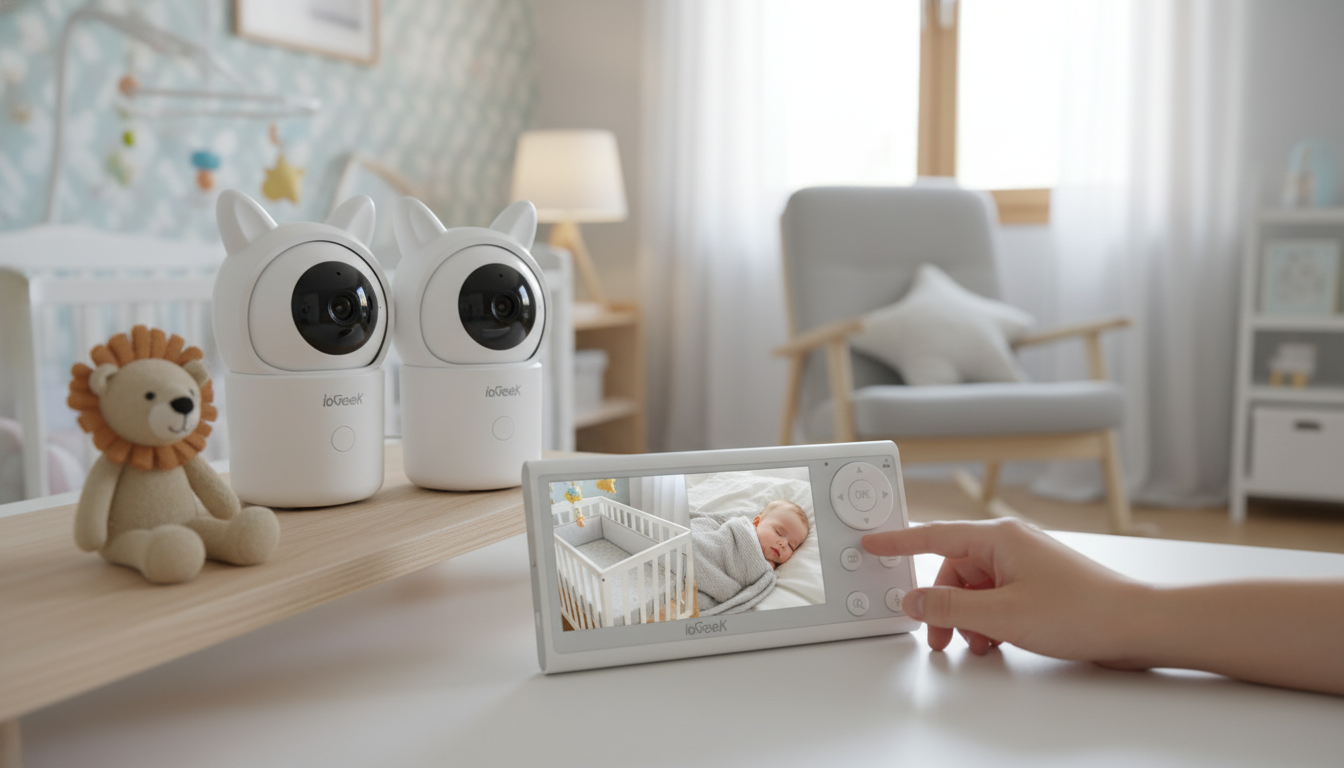
1080P Dual-Camera Monitoring: Why It Feels Different Day to Day
A dual-camera baby monitor changes the rhythm of checking in. Instead of moving one camera between a crib, bassinet, and changing station (or between siblings’ rooms), two live views stay ready where life actually happens. With split-screen viewing, small changes—waking up, rolling to the edge, standing for the first time—are easier to catch without constantly switching feeds. Add PTZ (pan/tilt/zoom), and you can reframe quickly as sleep positions and mobility evolve, without opening a door and risking a full wake-up. Smart alerts can also reduce “just one more check” habits during naps and nighttime when they’re tuned to your room’s real noise and motion patterns.
If you’re setting up a two-camera system now, the 1080P Dual-Camera Baby Monitor with PTZ, Split Screen & Smart Alerts is designed specifically for this kind of everyday coverage: two zones, quick scanning, and alerts that can be adjusted as routines settle in.
Feature Overview: 1080P, PTZ, Split Screen, and Smart Alerts
Specs matter most when they solve common at-home moments.
1080P clarity
1080P video helps you see more detail—especially when you zoom in. That can mean spotting blanket edges, checking pacifier placement, or seeing subtle movement through sleepwear. It’s still important to follow safe sleep guidance rather than relying on visuals alone; the American Academy of Pediatrics’ safe sleep recommendations are a solid reference point for room and crib setup (AAP Safe Sleep Recommendations).
PTZ control (pan/tilt/zoom)
PTZ is most useful as babies get mobile and the “center of action” drifts. A wide shot might work at two months; at eight months, the same baby might scoot to the corner, pull up on the rail, or crawl toward the play mat. PTZ lets you correct the frame instantly from the parent unit.
Split-screen viewing
Split screen is the feature that makes a dual-camera setup feel effortless. It works for twins, siblings in different rooms, or one camera on the crib and a second for a wider room view that includes the doorway or a floor play area.
Smart alerts
Alerts are most helpful when they’re calibrated to your home. Fans, humidifiers, pets, and even passing headlights can create motion or sound “events” that aren’t actually baby-related. A short tuning phase (a couple naps and a few nighttime cycles) usually makes a big difference.
Quick checklist for a dual-camera PTZ monitor
| Capability | Why it matters | Practical tip |
|---|---|---|
| 1080P resolution | Clearer detail during zoom and low light | Mount higher and zoom digitally only when needed to keep a stable wide view |
| PTZ control | Reframe without entering the room | Create a default preset aimed at the crib center, then a second preset for the doorway or play mat |
| Split-screen display | See two spaces at once | Pair one camera for close crib view and one for room-wide context |
| Smart alerts | Reduces constant manual checking | Start with medium sensitivity; adjust after 2–3 nap cycles to reduce false alarms |
| Two-camera coverage | Works for siblings or multiple zones | Keep both cameras on the same routine: same mount height, same angle style for easier scanning |
Room Placement That Improves Visibility and Reduces False Alerts
Placement is where “great on paper” becomes great at 2 a.m.
- Go elevated and out of reach: An elevated corner placement often gives the best view of the entire sleep surface while keeping the camera away from curious toddler hands.
- Avoid glare sources: Keep the lens out of the direct line of a night-light or a bright window. Glare and contrast shifts can make the scene look “busy” and may contribute to extra motion triggers.
- Watch for moving shadows: If motion alerts fire constantly, check for ceiling fan shadows, swaying curtains, or car headlights sweeping across the wall.
- Stabilize audio conditions: If you use white noise, keep the machine at a consistent distance from the camera microphone. Moving it closer night-to-night can cause frequent sound notifications.
If you run a humidifier for comfort, consistency helps alerts behave. A compact option like the Mini USB Aroma Humidifier & Essential Oil Diffuser with Soft LED Light can be easier to keep in the same spot—just remember that any steady hum may require lowering sound sensitivity to avoid constant pings.
Getting the Most from PTZ and Split-Screen in a Two-Room Setup
Two cameras can do two different jobs, which keeps checking in fast.
Smart Alerts: Which Ones Help Most and How to Tune Them
Privacy and Connection Basics for Baby Monitors
For a straightforward refresher on privacy basics, the Federal Trade Commission’s guidance is a reliable starting point (FTC: Protecting Your Privacy Online).
When This Monitor Is a Good Fit
For a single setup that covers these needs, the 1080P Dual-Camera Baby Monitor with PTZ, Split Screen & Smart Alerts fits routines that involve two spaces and quick, low-disruption check-ins.
FAQ
Which is the best dual camera app?
The best app is the one that stays stable in live view, manages multiple cameras smoothly (including split screen), offers clear alert controls, and supports strong account security like unique logins and 2FA. In practice, the most reliable choice is usually the app designed specifically for your monitor model so every feature works consistently.
Are dual lens cameras worth it?
They’re worth it when you need coverage in two zones or for two children, since you spend less time moving cameras and can confirm situations faster with split screen. The trade-off is higher cost and the need to mount and secure two cameras carefully for the best visibility and fewer false alerts.
Recommended for you


Who Owns Jimmy Choo? The Michael Kors Confusion
May 16, 2026













Leave a comment